Introduction

Temperature washing instructions
Being able to do things on your own is self-empowering and the key to independent living. To give someone the tools to build skills and confidence is what most trainers really love about their jobs.
This eLearning is meant to compliment the training app WASH APP! It will help you to create personalised and specific training apps for the people you are working with. The material will show you how to build a training app for helping someone with special needs to wash his/her clothes in a washing machine. You start with an app that already has a few ready-made frames, and adapt it to your special needs. To build an app is easy – and fun!
Washing instructions on clothes follow trading standard regulations and are common all over Europe. Therefore, you can use standard frames, already in the app. Washing machines, on the other hand, have no standard way of setting the temperature, length of program etc. Like people with special needs they are all unique. The app generator allows you as a trainer to create a personalised app to give the best possible support when training someone preparing for independent living to wash their own clothes.
Task
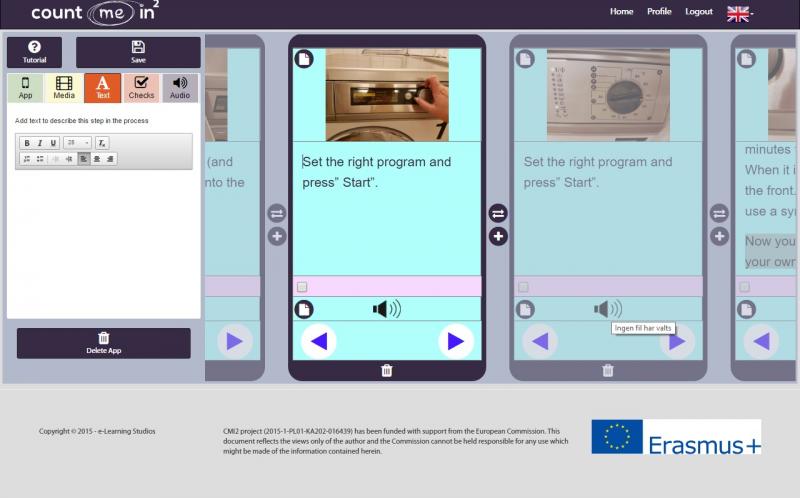
Build a Wash app! (Copyright Noomi Hebert)
This module will teach you how to build an app in a few, easy steps.
At http://www.cmi2.eu/en-gb/app_generator/home, you will find the app generator.
Your tasks are
To analyse the training needs and suitability of your trainee for independent living
To learn the basic instructions found on all items of clothing specifying the recommended washing temperatures and programs needed
To identify the specific settings of the trainees own washing machine
To learn to create an individualised training app for training them to wash their own clothes
Process
cc
This process will help you analyse the training needs and suitability of your trainee for independent living
Each app will will need to be tailored to the specific needs of your trainee. For some, a simple app hon how to sort their clothes, put them in the washing machine, closing the front and press “start” might be enough. In other cases, you might want to begin as early as shopping for fifferent washing powder and end with ironing and hanging everything up in their wardrobe.
Maybe you even want to add a bit of humour? https://www.dropbox.com/s/l0z6lagnk5su16t/nagging.png?dl=0
It is always best to start small, and then upgrade your WASH APP!. You might want to start with sorting the laundry. For others, however sorting can be the really hard part and you go straight to the machine. It is you, who know your trainee best! Adapt and individualise your WASH APP!
To learn the basic instructions found on all items of clothing specifying the recommended washing temperatures and programs needed
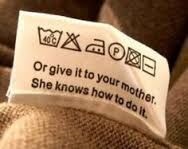
First, you have to know these instructions properly yourself. Can you understand all the symbols in the care label shown?
If it has mostly been your mother sorting your laundry out, it’s time to go to boot-camp!
A few recourses to check out:
http://www.textileaffairs.com/lguide.htm
https://www.persil.co.uk/laundry-tips/wash-care-symbols/
http://www.wikihow.com/Read-Clothing-Care-Labels
Identify the specific settings of the trainees own washing machine
Washing labels are fairly universal entities, however, washing machines are not alike. There are many different ways to program a washing machine, and the buttons are not always easy to decode.
Therefore, you will need to add pictures of the washing machine that your trainee is using. A few snapshots, taken with your mobile, will do just fine. Remember to picture every step of the way. No step should be taken for granted – closing the front, pressing “start” etc. might be done automatically by you, but not by your trainee.
To learn to create an individualised training app for training them to wash their own clothes
Open the ready-made WASH!-app
The app comes with a few ready-made screens.
This shows how to sort laundry in white/colour.
https://www.dropbox.com/s/g81v20z81umdg0n/white%20clothes.jpg?dl=0
There are some other tips too, like getting rid of stains.
https://www.dropbox.com/s/195kj3ae05nzmz2/20160916_190446.jpg?dl=0
If you wish to emphasize something else, other screens can easily be added. For example, you can take pictures of certain items of clothing, and add text like: 40 degrees, colour, NO tumble dry.
You can also add pictures for detergent, softener, how to hang something to dry, tips for the ironing and so on.
After looking at the trial app your task is to create an app for your trainee from scratch.